
Crypto gives users more control over their money, but it also gives them more responsibility. In traditional banking, a bank may reverse a suspicious transaction, freeze a stolen card, or help recover access to an account. In crypto, many mistakes are permanent.
If you send Bitcoin to the wrong address, approve a malicious smart contract, share your seed phrase, download a fake wallet app, or connect your wallet to a phishing website, your funds can disappear within seconds.
This is why crypto security is not optional.
Whether you use Coinbase, Binance, Kraken, MetaMask, Trust Wallet, Ledger, Trezor, Phantom, Rabby, Exodus, or a Bitcoin hardware wallet, you need strong security habits. A good wallet helps, but your behavior matters just as much as the technology.
Crypto scams are also becoming more advanced. The FBI’s 2025 Internet Crime Report showed cyber-enabled crimes defrauded Americans of nearly $21 billion, with cryptocurrency and AI-related complaints among the costliest categories. In June 2026, reports said the FBI and Google helped dismantle a phishing-as-a-service operation tied to about $1.9 billion in losses, over one million phishing URLs, and millions of stolen credentials and payment records.
That means wallet security is not only about remembering a password. It is about protecting your seed phrase, private keys, devices, browser extensions, exchange accounts, DeFi approvals, email, phone number, backups, and recovery plan.
This guide explains the best crypto security practices to protect your wallet, avoid scams, secure long-term holdings, and reduce the risk of permanent loss.
Important Disclaimer
This article is for educational and informational purposes only. It is not financial, investment, tax, legal, or professional cybersecurity advice. Cryptocurrency is risky, and no security method is perfect. Always verify information from official wallet, exchange, and security sources before taking action.
Why Crypto Security Matters
Crypto security matters because crypto ownership is based on private keys.
If someone controls your private key or seed phrase, they can control your crypto. If you approve a malicious transaction, funds may be drained. If your exchange account is compromised, the attacker may sell assets, withdraw funds, or lock you out.
Unlike card payments, many blockchain transactions are irreversible.
Common crypto security risks include:
- Seed phrase theft
- Private key theft
- Fake wallet apps
- Fake browser extensions
- Phishing websites
- Fake support agents
- SIM-swap attacks
- Weak passwords
- Exchange account hacks
- Malicious token approvals
- Address poisoning
- Clipboard malware
- Smart contract scams
- NFT phishing
- Fake airdrops
- Fake staking sites
- Malware and keyloggers
- Cloud backup leaks
- Social engineering
- Physical theft
- Lost recovery phrase
A strong crypto security plan should reduce both online and offline risks.
What Is a Seed Phrase?
A seed phrase, also called a recovery phrase or secret recovery phrase, is a list of words that can restore access to your wallet.
It may look like 12, 18, or 24 words.
Your seed phrase is the master backup of your wallet. If your phone breaks, laptop dies, wallet app is deleted, or hardware wallet is lost, your seed phrase can recover your wallet on a compatible device.
But this also means:
Anyone who has your seed phrase can steal your crypto.
MetaMask’s safety guidance tells users to secure their Secret Recovery Phrase, use strong passwords, verify dapps, and protect wallets from phishing and scams.
Seed Phrase Rules
Follow these rules carefully:
- Write your seed phrase offline
- Do not screenshot it
- Do not save it in email
- Do not store it in Google Drive
- Do not store it in iCloud
- Do not send it in WhatsApp or Telegram
- Do not type it into random websites
- Do not share it with support agents
- Do not give it to friends or family casually
- Do not print it on an internet-connected printer
- Do not keep it beside your hardware wallet
- Do not store it in a notes app
- Do not enter it into “wallet verification” websites
- Do not use wallets with pre-written seed phrases
A legitimate wallet company will never ask for your seed phrase through chat, email, phone, social media, or support ticket.
Private Key vs Seed Phrase
A private key controls one crypto address or account. A seed phrase can generate many private keys and wallet addresses.
| Term | Meaning | Risk |
|---|---|---|
| Private key | Controls a specific wallet address | If stolen, that address can be drained |
| Seed phrase | Master backup for wallet accounts | If stolen, entire wallet can be drained |
| Public address | Address used to receive crypto | Safe to share carefully |
| Password | Locks wallet app locally | Does not replace seed phrase |
| PIN | Protects hardware wallet access | Does not replace recovery phrase |
Many beginners think their wallet password is enough. It is not.
Your wallet password may protect the app on your device, but the seed phrase controls recovery. If the seed phrase is stolen, the password does not protect the funds.
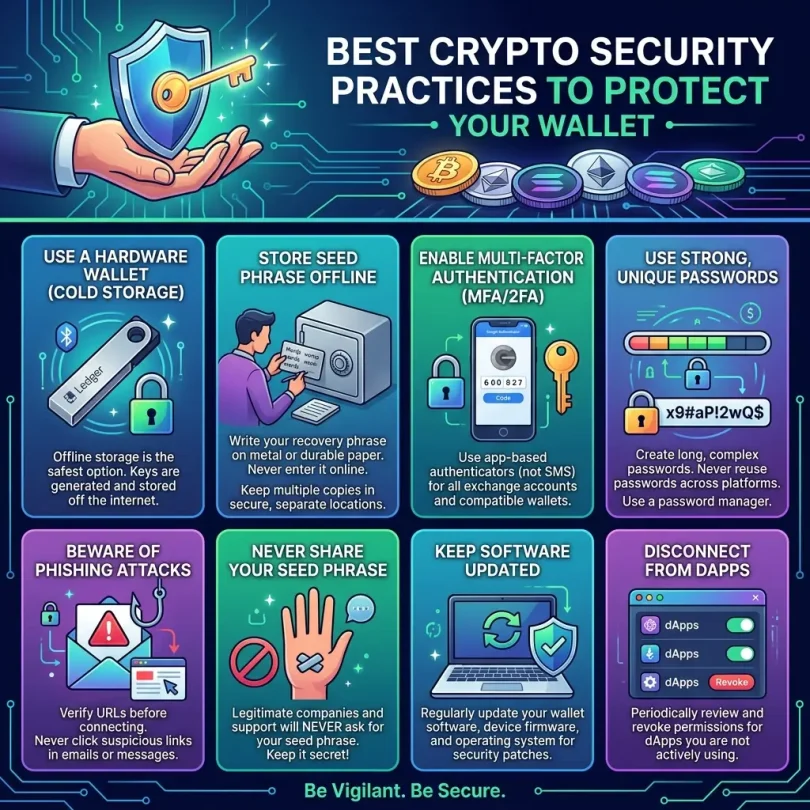
Best Crypto Security Practices to Protect Your Wallet
Below are the most important crypto security practices every investor should follow.
1. Use a Hardware Wallet for Long-Term Holdings
A hardware wallet is one of the best security upgrades for long-term crypto storage.
Examples include:
- Ledger
- Trezor
- Coldcard
- BitBox02
- Keystone
- SafePal S1
- Tangem
- GridPlus
A hardware wallet stores private keys away from your normal internet-connected phone or computer. You can use it to sign transactions while reducing exposure to malware and browser attacks.
Ledger explains that crypto wallets store keys and help users sign transactions, generate addresses, initiate transfers, track balances, manage crypto, and interact with dApps. Hardware wallets add protection by keeping key material isolated from normal online devices.
Best Practice
Use:
- Hot wallet for small daily activity
- Hardware wallet for long-term storage
- Separate DeFi wallet for dApps
- Separate exchange account for trading
Never keep your entire crypto portfolio in one hot wallet.
Important Warning
Buy hardware wallets only from official sources or authorized resellers. Fake devices can steal seed phrases. Earlier reporting has shown counterfeit hardware wallets and fake wallet apps can be designed to steal recovery phrases and PINs.
2. Never Share Your Seed Phrase
This is the most important rule in crypto security.
Do not share your seed phrase with:
- Wallet support
- Exchange support
- Telegram admins
- Discord moderators
- “Recovery experts”
- Friends
- Influencers
- Airdrop websites
- NFT mint sites
- Fake verification pages
- Google forms
- Browser popups
- Mobile apps asking to “sync wallet”
A real support team may ask for transaction hash, wallet address, ticket number, or device model. They should never ask for seed phrase or private keys.
If someone asks for your seed phrase, it is almost always a scam.
3. Use Strong Passwords and a Password Manager
Weak passwords are still a major reason accounts get compromised.
Use strong, unique passwords for:
- Crypto exchanges
- Email account
- Wallet apps
- Password manager
- Cloud accounts
- Hardware wallet app accounts
- Portfolio trackers
- Tax software
- Banking accounts
A strong password should be:
- Long
- Unique
- Random
- Not reused
- Not based on your name
- Not based on birthdate
- Not used on another website
Use a reputable password manager to generate and store passwords.
Do not reuse your email password on crypto exchanges. If one website leaks your password, attackers may try it on exchanges.
4. Enable Two-Factor Authentication
Two-factor authentication adds another layer of protection.
Use 2FA for:
- Crypto exchanges
- Email account
- Password manager
- Cloud storage
- Portfolio tracker
- Tax software
- Domain registrar
- Hosting account
Best 2FA Options
Good options:
- Hardware security key
- Authenticator app
- Passkeys where supported
Less ideal:
- SMS 2FA
SMS is better than no 2FA, but it is vulnerable to SIM-swap attacks. If possible, use an authenticator app or hardware security key.
Backup Codes
Save backup codes offline in a secure place. If your phone is lost, backup codes can help recover access.
5. Protect Your Email Account
Your email is often the recovery key for your exchange accounts.
If someone hacks your email, they may reset passwords, approve withdrawals, intercept alerts, or access sensitive documents.
Secure your email by:
- Using a strong unique password
- Enabling 2FA
- Checking recovery phone/email
- Reviewing logged-in devices
- Removing old app permissions
- Watching for forwarding rules
- Avoiding public Wi-Fi logins
- Using security keys if possible
Your email security is crypto security.
6. Beware of Phishing Websites
Phishing websites copy real wallet, exchange, NFT, or DeFi sites.
They may look like:
- MetaMask support page
- Ledger Live download
- Trezor update page
- Coinbase login page
- Binance login page
- OpenSea mint page
- Airdrop claim page
- Fake staking dashboard
- Fake token migration site
The goal is usually to steal your seed phrase, password, 2FA code, or wallet approval.
MetaMask emphasizes verifying dapps and protecting your wallet from phishing and scams in its Web3 safety guidance.
How to Avoid Phishing
- Bookmark official websites
- Type URLs manually
- Do not click random sponsored ads
- Avoid links from Telegram/Discord DMs
- Check domain spelling carefully
- Do not trust urgent popups
- Do not enter seed phrases online
- Use security extensions where appropriate
- Verify official social media links
- Use hardware wallet confirmation
Scammers often create domains that look almost identical to real websites.
7. Download Wallet Apps Only From Official Sources
Fake wallet apps are dangerous. They may copy real wallet branding and steal seed phrases.
Only download wallet apps from:
- Official wallet website
- Official app store link from the wallet website
- Verified browser extension store listing
- Hardware wallet official website
Do not search “MetaMask download” or “Ledger Live download” and click the first ad blindly. Fake ads can appear.
MetaMask’s official website states its wallet gives users control over data and assets and highlights security alerts, Wallet Guard, support, real-time threat monitoring, and audits. Use official sources instead of random download links.
8. Separate Wallets by Purpose
Do not use one wallet for everything.
Use separate wallets:
Long-Term Storage Wallet
For Bitcoin, Ethereum, and major long-term holdings.
Best with hardware wallet.
DeFi Wallet
For connecting to dApps, swaps, staking, NFTs, and testing protocols.
Keep smaller balances.
NFT Wallet
For minting, collecting, and marketplace activity.
Airdrop Wallet
For risky airdrop claims and new projects.
Keep very low balance.
Exchange Account
For trading only.
Do not store long-term funds on exchanges unless you intentionally accept that risk.
This is sometimes called reducing your “blast radius.” If one wallet is compromised, the attacker does not get everything.
9. Revoke Old Token Approvals
When you use DeFi apps, NFT marketplaces, or token swaps, you often grant permission for a smart contract to spend your tokens.
These permissions are called token approvals.
If a malicious or compromised dApp has unlimited approval, it may drain tokens later.
Revoke.cash explains that when using dapps like Uniswap or OpenSea, users grant permission to spend tokens and NFTs; if approvals are not revoked, the dapp can spend tokens forever. It supports revoking approvals on Ethereum and more than 100 other networks.
What to Do
Regularly check and revoke:
- Old DeFi approvals
- NFT marketplace approvals
- Unlimited approvals
- Unknown contracts
- Old bridge approvals
- Suspicious token approvals
- Airdrop claim approvals
Use trusted approval-checking tools and verify URLs carefully.
10. Watch Out for Address Poisoning
Address poisoning is a scam where attackers send tiny transactions from addresses that look similar to addresses you have used before. The goal is to trick you into copying the attacker’s address from your transaction history.
A 2025 research paper on Ethereum wallet address poisoning found that millions of Ethereum users had been targeted and more than $100 million had been lost. It also found that many wallets still had gaps in warning users about address poisoning attempts.
How to Avoid Address Poisoning
- Do not copy addresses from transaction history blindly
- Use saved address books
- Verify full address, not just first/last characters
- Send a small test transaction first
- Use hardware wallet screen verification
- Use ENS/name services carefully
- Confirm addresses out-of-band for large transfers
- Use withdrawal allowlists on exchanges
This attack works because users often check only the first and last few characters of an address. For large transfers, verify the full address.
11. Use Exchange Withdrawal Whitelists
Many exchanges allow withdrawal address whitelisting or allowlists.
This means funds can only be withdrawn to approved addresses.
Use withdrawal whitelists for:
- Coinbase
- Kraken
- Binance
- Gemini
- Crypto.com
- OKX
- Bybit
- Other exchanges that support it
Benefits:
- Reduces damage if account is hacked
- Prevents instant withdrawal to unknown address
- Adds delay for new addresses
- Helps protect long-term funds
Also enable:
- Login alerts
- Anti-phishing codes
- Device approval
- Withdrawal confirmation
- 2FA for withdrawals
An exchange account should be treated like a bank account plus crypto wallet combined.
12. Avoid SMS-Only Security
SMS is convenient, but not ideal for crypto accounts.
SIM-swap attackers can trick mobile carriers into moving your phone number to their SIM card. Then they may receive SMS codes and reset accounts.
Better options:
- Hardware security keys
- Authenticator apps
- Passkeys
- Device-based approval
- Email security key
- Exchange-specific 2FA
If you must use SMS, protect your mobile account with a carrier PIN and avoid publishing your phone number publicly.
13. Verify Every Transaction Before Signing
In Web3, signing is powerful.
A signature can:
- Approve token spending
- List NFT for sale
- Transfer assets
- Permit a contract to move tokens
- Connect wallet to a dApp
- Sign a malicious order
- Authorize a transaction you do not understand
Never sign quickly just because a website says “verify wallet.”
Before signing, check:
- Website URL
- Contract name
- Token amount
- Network
- Spending approval
- Recipient address
- Gas fee
- NFT permission
- Whether it is a message or transaction
- Whether it gives unlimited access
MetaMask highlights security alerts, threat monitoring, and transaction security checks as part of its security-focused wallet experience. Still, users must read what they sign.
14. Keep Devices Clean and Updated
Your wallet is only as safe as the device you use.
Protect your phone and computer:
- Keep operating system updated
- Keep browser updated
- Keep wallet app updated
- Use antivirus or endpoint protection where appropriate
- Avoid pirated software
- Avoid cracked trading tools
- Remove suspicious extensions
- Do not install random APKs
- Lock your device
- Use disk encryption
- Avoid public computers
- Avoid public Wi-Fi for crypto actions
- Use a separate browser profile for crypto
Crypto malware can steal clipboard addresses, browser data, passwords, and wallet files.
15. Do Not Store Large Funds in Hot Wallets
Hot wallets are useful, but risky for large balances.
Examples:
- MetaMask
- Trust Wallet
- Phantom
- Coinbase Wallet
- Rabby
- Exodus mobile/desktop
Hot wallets are connected to internet devices. They are good for:
- Small transactions
- DeFi testing
- NFT minting
- Daily spending
- Low-value activity
They are not ideal for storing your life savings.
For long-term crypto holdings, use:
- Hardware wallet
- Multisig wallet
- Cold storage
- Institutional custody, for businesses
- Carefully planned self-custody
16. Use Test Transactions for Large Transfers
Before sending a large amount, send a small test transaction.
Example:
- Send $10 worth of crypto
- Confirm it arrives
- Verify network and address
- Then send the larger amount
This is especially important when using:
- New exchange withdrawal address
- New wallet
- New blockchain
- Bridged assets
- Stablecoins on multiple networks
- Hardware wallet setup
- Business treasury transfer
Test transactions cost a small network fee, but they can prevent major losses.
17. Understand Network Differences
Crypto assets can exist on multiple networks.
For example, USDT may exist on:
- Ethereum
- Tron
- BNB Chain
- Polygon
- Solana
- Arbitrum
- Optimism
USDC may also exist on many networks.
If you send a token on the wrong network, recovery may be difficult or impossible depending on wallet/exchange support.
Before sending:
- Match token
- Match network
- Check destination support
- Confirm address format
- Send test transaction
- Read exchange deposit warnings
Do not assume “USDT is USDT” across every network.
18. Avoid Fake Airdrops and Token Claims
Airdrop scams are common.
Scammers may say:
- “You are eligible for free tokens”
- “Connect wallet to claim”
- “Urgent claim ends today”
- “Verify your wallet”
- “Approve migration”
- “Sign to unlock rewards”
- “Claim NFT reward”
The scam may drain tokens or NFTs after approval.
NFT phishing is also a serious issue. A 2025 research paper on NFT scams found that phishing-related accounts made up a small percentage of accounts but appeared in a much larger share of transaction scenarios, showing how active phishing interactions are in NFT ecosystems.
Only claim from official project domains, verify announcements across multiple official channels, and use a separate low-balance wallet for risky claims.
19. Beware of Fake Crypto Support
Fake support scams target users who are already stressed.
You may post on Twitter, Reddit, Telegram, or Discord:
- “My wallet is stuck”
- “I lost my MetaMask”
- “My transaction failed”
- “Ledger not working”
- “Need recovery help”
Scammers may message you pretending to be support.
A research paper on cryptocurrency-based technical support scams found that fraudsters target wallet-related issues on social media and often ask victims for secret key phrases or direct payments to scam wallets.
Real support will not ask for your seed phrase.
20. Create a Recovery and Inheritance Plan
Crypto security is not only about hackers. It is also about access.
What happens if:
- Your phone breaks?
- Your hardware wallet is lost?
- Your house floods?
- You forget your PIN?
- You pass away?
- Your family does not know how to recover funds?
- Your seed phrase is damaged?
A recovery plan should include:
- Secure seed phrase backup
- Backup location strategy
- Hardware wallet recovery instructions
- Emergency contact instructions
- Legal estate planning where appropriate
- No seed phrase exposure in public documents
- Clear separation of passwords and recovery phrases
Be careful. An inheritance plan should help trusted people recover assets without exposing everything to theft today.
For large amounts, consult legal and security professionals.
Crypto Security Checklist
Use this checklist to improve your wallet security.
| Security Area | Best Practice |
|---|---|
| Seed phrase | Store offline, never share |
| Hardware wallet | Use for long-term holdings |
| Hot wallet | Keep small balances only |
| Passwords | Use unique strong passwords |
| 2FA | Use authenticator or security key |
| Secure with strong 2FA | |
| Exchanges | Enable withdrawal whitelist |
| DeFi | Revoke old approvals |
| NFTs | Avoid fake mint and claim links |
| Downloads | Use official wallet sources |
| Transactions | Verify before signing |
| Transfers | Use test transactions |
| Networks | Confirm correct chain |
| Devices | Keep clean and updated |
| Recovery | Create backup and inheritance plan |
Best Security Setup by User Type
Beginner Investor
Use:
- Coinbase or Kraken with strong 2FA
- Small mobile wallet balance
- Hardware wallet after portfolio grows
- Password manager
- Withdrawal whitelist
- No DeFi until educated
Long-Term Holder
Use:
- Hardware wallet
- Offline seed phrase backup
- Test transactions
- Minimal smart contract interaction
- Separate exchange account for buying
- Strong recovery plan
DeFi User
Use:
- Separate DeFi wallet
- Hardware wallet signing
- Approval revocation
- Risky wallet for new protocols
- Small balances for testing
- Transaction simulation tools
- Avoid unknown dApps
NFT Collector
Use:
- Separate NFT wallet
- Hardware wallet for valuable NFTs
- Avoid fake mint links
- Revoke marketplace approvals
- Verify collection links
- Never sign unknown listings
Business or Team
Use:
- Multisig wallet
- Hardware wallets for signers
- Role-based access
- Written treasury policy
- Separate operational and reserve wallets
- Professional custody for large funds
- Accounting records
Common Crypto Security Mistakes
Mistake 1: Saving Seed Phrase in Cloud
Cloud accounts can be hacked.
Mistake 2: Using One Wallet for Everything
One compromised wallet can drain everything.
Mistake 3: Trusting Fake Support
Anyone asking for seed phrase is a scam.
Mistake 4: Ignoring Token Approvals
Old approvals can remain dangerous.
Mistake 5: Clicking Sponsored Search Ads
Fake wallet ads can appear above real sites.
Mistake 6: Using SMS as Main Protection
SIM swaps can compromise accounts.
Mistake 7: Not Testing Transfers
Wrong-network transfers can be expensive.
Mistake 8: Signing Without Reading
Wallet drainers rely on rushed approvals.
Mistake 9: Keeping Too Much on Exchanges
Exchange risk is real.
Mistake 10: No Recovery Plan
Strong security should also include safe recovery.
Final Verdict: How to Protect Your Crypto Wallet
The best crypto security strategy is layered.
Do not rely on one password, one wallet, or one app.
For most investors, the strongest practical setup is:
- Use a hardware wallet for long-term holdings
- Keep only small funds in hot wallets
- Never share your seed phrase
- Use a password manager
- Enable strong 2FA
- Secure your email
- Use withdrawal whitelists
- Bookmark official websites
- Avoid fake airdrops and support agents
- Revoke old token approvals
- Verify every transaction
- Send test transactions before large transfers
- Keep devices updated
- Create a recovery plan
Crypto security is a habit, not a one-time setup.
The safest wallet is not only the wallet with the best technology. It is the wallet used by a careful owner who understands seed phrases, phishing, approvals, devices, backups, and transaction risk.
FAQs About Crypto Security Practices
What is the most important crypto security practice?
The most important practice is protecting your seed phrase. Never share it, never store it online, and never enter it into random websites. Anyone with your seed phrase can control your wallet.
Is a hardware wallet safer than MetaMask?
A hardware wallet is generally safer for long-term storage because private keys are kept away from normal internet-connected devices. MetaMask is useful for DeFi and Web3, but it is a hot wallet unless paired with hardware wallet signing.
Can someone steal crypto without my seed phrase?
Yes. Attackers may steal crypto through malicious approvals, fake signatures, exchange account hacks, clipboard malware, SIM swaps, phishing, or device compromise.
Should I keep crypto on an exchange?
Exchanges are convenient for trading, but they create platform and account risk. Long-term holders often move funds to hardware wallets or other self-custody setups.
What is a token approval?
A token approval gives a smart contract permission to spend your tokens or NFTs. Revoke.cash explains that if approvals are not revoked, a dApp may be able to spend tokens forever.
What is address poisoning?
Address poisoning is a phishing attack where scammers create similar-looking addresses in your transaction history to trick you into copying the wrong address. Research has found millions of Ethereum users targeted and more than $100 million lost.
Is SMS 2FA safe for crypto?
SMS 2FA is better than no 2FA, but authenticator apps, passkeys, or hardware security keys are usually safer because SMS can be targeted through SIM-swap attacks.
How do I avoid fake wallet apps?
Download wallets only from official websites or verified app store links. Do not click random ads or download wallet apps from social media links.
Should I revoke token approvals?
Yes, especially old, unknown, or unlimited approvals. This can reduce risk if a dApp or smart contract is malicious or compromised.
What should I do before sending a large crypto transfer?
Verify the address, confirm the network, check the destination supports that asset, use a small test transaction, and confirm details on your hardware wallet if using one.